Free CloudConvert & ConvertAPI Alternative for HTML to PNG
If you've searched for a way to convert HTML to PNG, there's a good chance CloudConvert or ConvertAPI showed up first — and a good chance you hit a wall a few seconds later: an upload limit, a "sign up to continue" screen, or an API key you didn't want to generate for one image.
Whether you call it converting, changing, or turning HTML into a PNG, the underlying need is usually the same: you have a piece of markup and you want an exact image of it, without setting up an account or a backend. This guide compares the popular options and shows the fastest free way to do it.
The fastest free way to convert HTML to PNG
Heicly runs entirely in your browser tab, so there's no upload step and nothing to install. Convert HTML to PNG free, directly on the page:
- Open the Heicly HTML to PNG Converter.
- Paste your HTML — and CSS, SCSS, SASS, or LESS if you have it — into the code boxes, or drop up to 15 files at once.
- Set your output width and toggle a transparent background if you need one.
- Click Convert. Download the PNG instantly, or grab everything together as a zip.
Why it's private: Heicly renders your HTML using your browser's own engine, so there's no server in between. Your markup is never uploaded, logged, or stored anywhere.
Heicly vs. CloudConvert vs. ConvertAPI
CloudConvert and ConvertAPI solve a different problem than a dedicated HTML-to-PNG tool. CloudConvert is a general-purpose file converter that happens to support HTML — you upload a file and it renders on their servers. ConvertAPI is built for developers: it's a REST API meant to be wired into an app or script, not opened in a browser for a single conversion. Here's how the three compare:
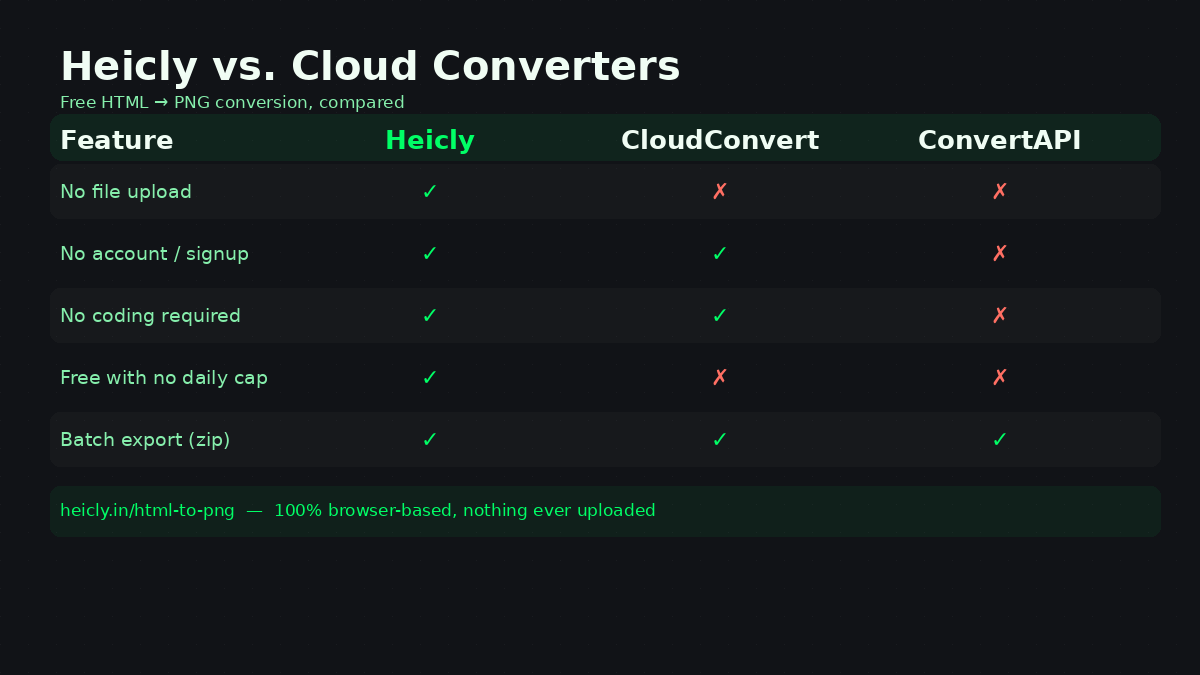
| Feature | Heicly | CloudConvert | ConvertAPI |
|---|---|---|---|
| What it is | Free browser-based HTML to PNG converter | General file converter (200+ formats) | Developer-focused conversion API |
| File upload | Never — renders in your browser | Yes, to their servers | Yes, via API call |
| Coding required | No | No, for the web interface | Yes, always |
| Free usage | Unlimited, no account | ~25 conversions/day, no signup | Trial only (250 conversions/30 days), then paid |
| Best for | A quick, exact HTML/CSS → PNG export | Converting between many unrelated formats | Automating conversions inside your own app |
If you only need a converter for the occasional HTML-to-PNG job, Heicly gets you there faster since there's no account to create and nothing to upload. If you're already building a pipeline that needs an API, ConvertAPI or CloudConvert's API are reasonable choices — just budget for the credits.
What about Chrome's built-in screenshot tools?
Since Chrome can already render HTML, some people try to convert a Chrome HTML document to PNG by right-clicking a page or using Chrome DevTools' full-size screenshot command. It works, but it comes with trade-offs: you need to open DevTools, it only captures what's already rendered live on a page rather than raw code you're editing, and getting a transparent background or an exact pixel width usually means fighting with print styles.
Heicly skips that step entirely. Paste the raw HTML and CSS you're working with, set the exact width, and it renders and exports the PNG directly — no open tab or DevTools panel required. It's the more direct way to convert an HTML document to PNG when you're starting from code rather than a live page.
Need to automate it? Puppeteer, PuppeteerSharp, and C#
If you're searching for an HTML to image converter like Puppeteer but online, you're likely after something with the same rendering accuracy as a real Chromium engine, minus the setup. That's a fair way to describe Heicly — it uses your browser's own rendering engine, the same family Puppeteer automates.
Puppeteer itself is a Node.js library for driving headless Chrome, and it's genuinely the right tool when you need to convert HTML to PNG as part of an automated pipeline — batch reports, scheduled jobs, or a backend service. The trade-off is setup: installing Node.js, the Puppeteer package, and a Chromium binary, then hosting and maintaining that environment. For C# and .NET projects, PuppeteerSharp is the closest equivalent and carries the same setup overhead.
If that's more infrastructure than a single conversion needs, Heicly is the manual counterpart: open the page, paste the code, get the PNG. It isn't a replacement for a production pipeline, but for a one-off export it removes the entire setup step.
Isn't PNG to HTML a different tool?
It is. Converting an image back into HTML — sometimes searched as PNG to HTML — usually means feeding a screenshot into an image-to-code or OCR-based tool that guesses at markup, spacing, and colors from pixels. It's a fundamentally different, lossier process than what this guide covers. Heicly goes the other direction, from real HTML/CSS source to a pixel-accurate PNG, so nothing about the layout is guessed — it's the same code you wrote, rendered exactly.
Frequently asked questions
Is there a free alternative to CloudConvert for converting HTML to PNG?
Yes. Heicly converts HTML to PNG for free with no daily limit and no account, since the conversion happens in your browser instead of on a server. CloudConvert's free tier works too, but it's capped at a limited number of conversions per day.
Is there a free alternative to ConvertAPI for HTML to PNG?
Yes. ConvertAPI is built for developers and requires signing up for a time-limited free trial before you're billed. Heicly does the same HTML-to-PNG conversion without any API key, account, or trial period — you just paste your code.
Is there an online tool like Puppeteer for HTML to PNG, without writing code?
Heicly is the closest match. It renders your HTML and CSS using your browser's own engine — the same family of engine Puppeteer automates — but through a page you use directly instead of a script you write and host.
How do I convert a Chrome HTML document to PNG?
You can use Chrome DevTools' full-size screenshot command on a live page, but it only captures what's already rendered in the tab. To convert the raw HTML file or code itself, paste or drop it into Heicly instead — it renders the document and exports a PNG directly, with control over width and background transparency.
Can I convert HTML to PNG using C#?
Yes, typically with PuppeteerSharp, which automates headless Chrome from .NET code — useful for backend pipelines, but it requires installing and hosting a Chromium instance. For a single, one-off conversion without that setup, Heicly does the same rendering directly in your browser.
Is Heicly really free to convert HTML to PNG?
Yes. There's no account, no conversion limit, and no premium tier — it's fully free, supported by ads that are kept separate from anything you convert.
Does Heicly upload my HTML or CSS code to a server?
No. Conversion happens entirely inside your browser using JavaScript. Your code is never uploaded, transmitted, or stored anywhere.
What's the difference between HTML to PNG and PNG to HTML?
They're opposite processes. HTML to PNG, which is what Heicly does, renders real code into an exact image. PNG to HTML goes the other way, using image-to-code or OCR tools to guess at markup from a picture — a different, less precise task.
Ready to convert your HTML to PNG?
Open the converter →